

Are You an ACD/Labs Software User?
If your software is under maintenance, you can get answers to many of your questions in the Customer Portal (the Portal is not accessible to Freeware users or those trialing software). Register/login to the Customer Portal to access movies, quick start guides, and more resources to help you use your ACD/Labs software like a pro.
-
How do I install ACD/Labs software?
See how to install ACD/Labs software in these short videos.
Install in Broadcast Mode: This is the most common method of installation used by the majority of ACD/Labs software users. It is a local installation that is activated on the same computer on which it is used.
Install License Server: License Server is used to manage numerous licenses across multiple locations, including ChemSketch Freeware Site Licenses. It must be installed and configured before installing the software on the client (below).
Install in License Server Mode: This type of installation is used by customers whose license is managed by a License Server serving multiple locations. Before installing the software in this mode, the License Server must be installed and configured.
Troubleshooting tips
- Deactivate and uninstall old versions first—we recommend that only one installation of ACD/Labs software be installed on a computer
- Make sure you have administrative rights to install software
- Consult with your IT department to ensure that any antivirus or antimalware programs that may interfere with installation have whitelisted ACD/Labs applications
-
How do I activate ACD/Labs software?
Your software should be activated automatically as part of the installation process. If activation did not proceed as expected, watch the video or follow the activation steps below. (If you are activating licenses on the Linux platform please contact technical support).- Launch the ACD/Labs Licensing tool (REGISTER.EXE) by navigating to Start → All Programs → ACD/Labs → Licensing → Register (Run as Administrator)

- Once the ACD/Labs registration window is shown, click Activate

- Your license should now be activated

If you receive the following error, click Cancel.

- Click Yes

- Click Ask for Activation. Do not close this window (you will need to paste the activation response key here later)

- The pop-up window will contain an automatically generated message. Do not click on the Send E-Mail button because the window may not communicate with your default e-mail program.

- Open your preferred email client, generate a new message, and copy/paste the address, subject, and contents of the Activation E-mail message

(If you are activating the license on Chinese or Japanese Windows platforms, please contact technical support). - Within a few minutes, you should receive an email containing the Activation Response Key

- In the Activation dialog box from Step 2 above, click Activate

- Paste the Activation Response Key from the email and click OK

- Click OK in the prompt below. Your license is now activated.
- Launch the ACD/Labs Licensing tool (REGISTER.EXE) by navigating to Start → All Programs → ACD/Labs → Licensing → Register (Run as Administrator)
-
How do I deactivate ACD/Labs software?
The following describes the process for deactivating your ACD/Labs software license. Please note that deactivation is required prior to deleting keys to free a license when transitioning an installation to another computer.
- Launch the ACD/Labs Licensing tool (REGISTER.EXE) by navigating to Start → All Programs → ACD/Labs → Licensing and launching Register (Run as Administrator)

- Once the ACD/Labs registration window is shown, click Deactivate

- You will know that the deactivation was completed successfully when the Deactivate button reverts to Activate

- If you receive the following error; click Cancel and then click Yes to continue with manual deactivation

- Click Ask for Deactivation

The window that pops up will contain an automatically-generated message. Do not click on the Send E-Mail button; this window may not communicate with the default e-mail program.

- Open Outlook (or another email client), generate a new message and copy/paste the address, subject, and contents of the Deactivation E-mail message. If you are deactivating the license on the Chinese or Japanese Windows platforms, or the Linux platform, please contact technical support.

- After sending the message containing the Deactivation Request Key, you will receive a reply containing the Deactivation Response Key.

- Repeat Step 1.
- Repeat Step 2.
- This time, click Deactivate

- Paste the Deactivation Response Key from the message sent to you by ACD/Labs into the opened form and click OK.

- Your license is now deactivated.

- Launch the ACD/Labs Licensing tool (REGISTER.EXE) by navigating to Start → All Programs → ACD/Labs → Licensing and launching Register (Run as Administrator)
-
Can I have multiple ACD/Labs installations on the same machine?
We recommend a single installation for a given operating system. Versions 2018 and older (Windows 32-bit OS) should not be installed alongside newer versions.
-
How do I create a silent installer for site license installation?
For Windows desktop installations, please run setup.exe with the /a flag from an administrative command prompt and follow the instructions to create a silent installer. Refer to the installation guide provided with the software for more details.
-
Why was I asked to activate my license for a second time?
Some changes to computer hardware (such as MAC address, hard drive, or computer name) can invalidate the license activation. When this happens, you will be prompted to activate the license again.
Note that the software may stay activated on the old device.
Before you change your hardware, make sure you deactivate the software on the old device. Otherwise, you may not be able to activate it again. If you have any trouble with this, please email [email protected] for assistance.
-
How do I move my license to a new computer?
Depending on the type of license, you may need to deactivate the software license from the old computer before you can install and activate it on the new machine.
If your computer is inaccessible, please send a deactivation request to technical support (you will need to include the 5-digit license ID). If possible, please also include the computer name of the old machine. For multi-user licenses, please include a list of computer names that should not be deactivated.
-
My download link expired. Can you re-send my download link?
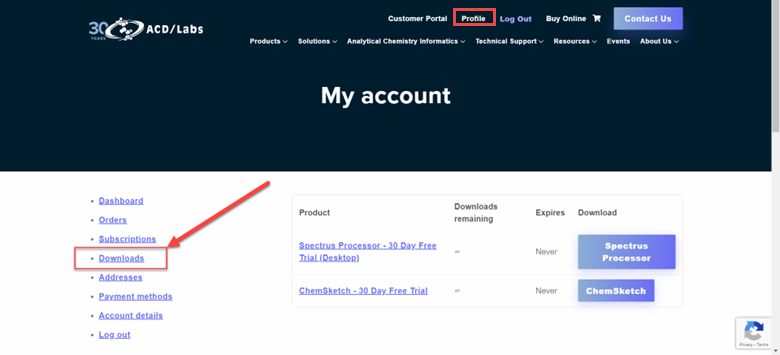
You can access your download link from your account Profile. It will be under the Downloads section for 12 months from the date you downloaded it. Login to your account here to access your download link.
-
How do I get activation keys to install the 30-day trial download?
-
- Activation keys are automatically sent to you during the installation process. Proceed to install the software and an activation key will be sent to you later.
- If you have not received the keys after completing the installation, please follow these steps
-