

Skip To Content
Current Software Versions

What's New in Katalyst D2D® Version 2025

Version 2025.3 of Katalyst D2D introduces the integration of AI tools for efficient exploration of chemical reaction space, integration with Revvity Signals Notebook, and support for kinetic and solubility studies. It also includes improvements in multichannel aspirate/dispense patterns, and more. Read below for details, and contact us for help upgrading your software.


Highlighted Features  |  Improved Features  |  Data Analysis

Highlighted Features

Expansion of Integrations Portfolio

Integrated AI Tools for Reaction Screening and Optimization

Explore chemical reaction space more efficiently using Bayesian optimization tools now integrated with the software. These AI tools enable an iterative process for the prediction of reaction outcomes in HT experiments. Use the functionality to attain optimal reaction parameters with the fewest number of experiments.

Initial reaction design is carried out in Katalyst. Reaction parameters are pushed into the AI tool which suggests a set of experiments that are imported directly into Katalyst for subsequent execution. Analytical results from the run are exported from Katalyst into the AI tool for subsequent optimization cycles.

Two AI-enabling integrations are available:

  • EDBO+ (Experimental design via Bayesian optimization)—open-source, developed by UCLA (optional add-on)
  • SDLabs Platform from Atinary Technologies (license of third-party software required)

Bidirectional Integration with Signals Notebook

Users of Revvity Signals Notebook, you can now leverage Katalyst to streamline HT reaction screening for optimization of experimental parameters. The workflow and integration points are as follows:

  • Pull parallel reaction information from Signals Notebook into Katalyst
  • Carry out experiment design, planning, execution, and analysis in Katalyst
  • Push individual reaction results back into Signals as sub-experiments

Improved Features

Improvements in Experiment Planning

Define Material Amounts Relative to Any Reagent

  • You now have the flexibility to define material amounts relative to any reagents in the experiment—by molar equivalent, mass, or volume. Previously this was restricted to molar equivalents relative to the limiting reagent.

Create and Easily Reuse Complex Multichannel Aspirate/Dispense Patterns

  • You can now create, apply, and save complex multichannel aspirate/dispense patterns as templates for quick and convenient future use
Define the aspirate/dispense plates and gaps across rows and columns for both. Well contents of Reaction plate 1 (left) are dispensed into Reaction plate 2 (right) with a gap of 1 well in the rows and columns.

User-Friendly Reports for Manual Procedures

  • You can now conveniently summarize the information previously available in the Full Report in a more concise manner with visual cues to aid practical execution. This new printable Condensed Procedure Report includes:
    • Materials dispensing information grouped by class
    • Dispense operations in full plate view
    • Color coding of materials by class
    • Clearer summary of compounds and stock solutions
The “Condensed procedure report” provides a summarized and intuitive procedure list for manual operations.
  • You can also generate a more succinct procedure list in Excel format with the Reaction Summary report, which provides:
    • A summary of compounds and stock solutions including material amounts per reaction well
    • Full plate summary for all materials and amounts in table view
The Reaction summary report offers a full plate view of materials and amounts for manual operations in Excel format.

Query Experiments by Structure/Substructure/Similarity

  • You can now search for experiments that contain a particular molecular entity by exact structure, substructure, or structural similarity in the Katalyst Dashboard

Support for Kinetic & Solubility Studies

New Functionality for Reaction Kinetic Studies

  • You can now define sample timepoints and generate aspirate/dispense patterns in the Set Up samples wizard for reaction kinetics
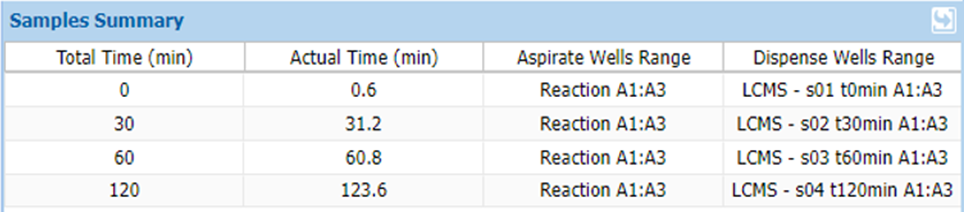
The Samples Summary table displays the set of samples and timepoints defined (Total Time) and collected (Actual Time) in kinetic studies, which you can now define in the Set Up Samples wizard.
  • You can now conveniently view results and generate kinetic plots for the different materials in your experiment (e.g., product, impurities, starting materials). You can also:
    • Choose to display multiple time points on the same plot
    • Overlay kinetic plots for different materials
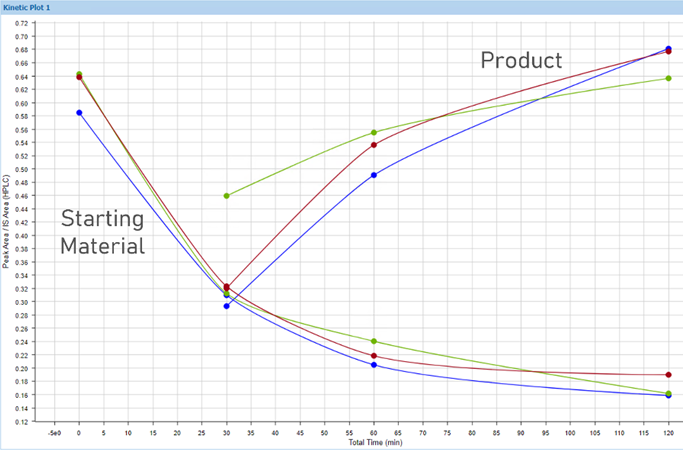
Generate and visualize kinetic plots for different materials (starting material and product).

Visualize Results for Solubility Studies

  • You can now easily generate plots for solubility studies where data is collected in duplicate/triplicate and visualize the combined results
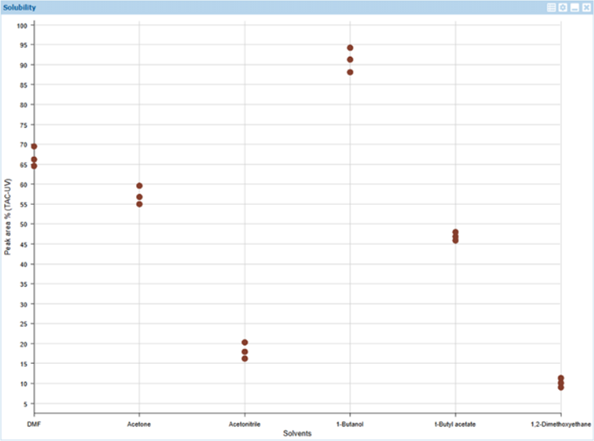
Generate and visualize results from solubility studies. This example plot shows the solubility results (area % by LC/MS) of a particular test material in 6 different solvents (x axis) in triplicate.

Improvements in Data Analysis

Analyze MS Data with Expanded Functionality

  • You can now detect multi-charged species in mass spectra
  • You can now define MS-inactive compounds to reduce false positive assignments in mass spectra
  • You now have the option to exclude assignment of particular material classes for more streamlined analysis of mass spectral and chromatographic data

Review Comprehensive Experiment Data in Custom Tables

  • You can now build custom tables that combine data from reaction wells (e.g., components, quantities, temperature) and analytical results (e.g., peak area, custom calculations) for a complete summary of your HT experiment

Want to learn more?

Read more about the full features of Katalyst D2D, or contact us for help upgrading your software.

Learn More About Katalyst D2D